Kalshi Trading Journal Template: Track Every Prediction Market Trade
Stop guessing. Start tracking. A Notion trading journal built specifically for Kalshi and Polymarket traders — trade log, P&L dashboard, strategy tracker, and weekly reviews. Duplicate in one click.
The Problem
Most prediction market traders lose money and have no idea why. They track trades in spreadsheets designed for stocks. They forget to log resolutions. After 50 trades, they cannot tell you which strategy actually makes money.
Without a proper trading journal, every loss is a mystery and every win is luck.
The Solution
This Notion template gives you the same journaling framework professional quant traders use — adapted for prediction markets. Log every trade in under 30 seconds. See your edge accuracy in real time. Review your week in 5 minutes every Sunday.
In one month, you will know exactly which strategies work — and which ones are costing you money.
What's Inside the Template
📊 Trade Log Database
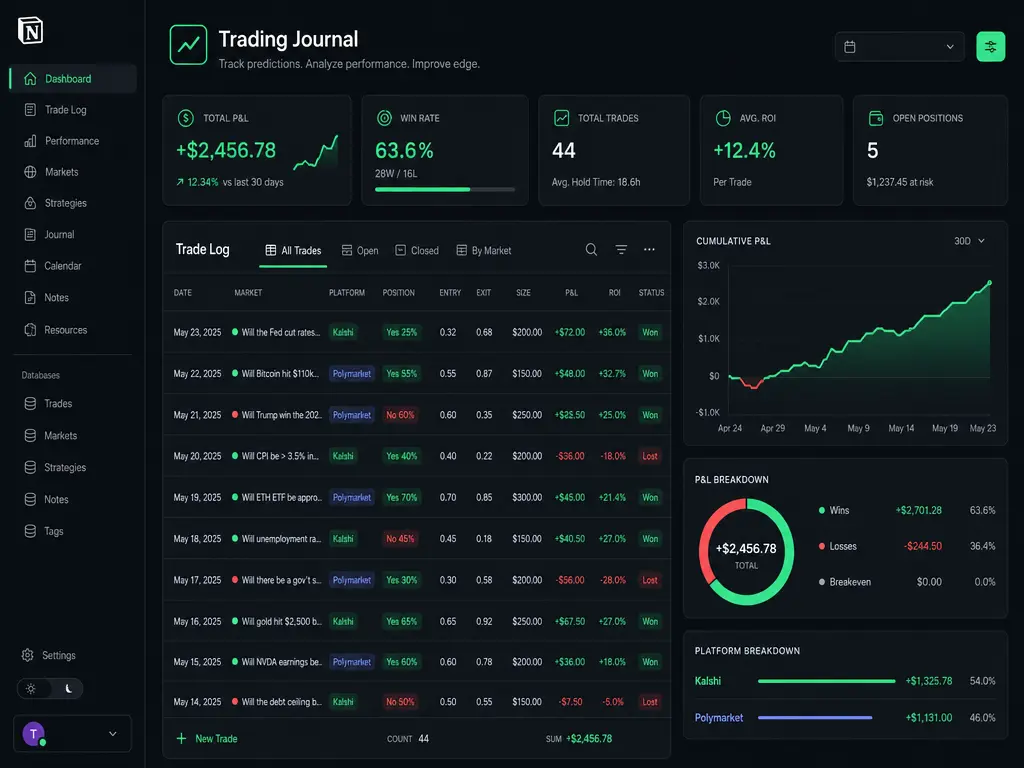
13 properties: Date, Platform (Kalshi/Polymarket), Ticker, Side (YES/NO), Entry Price, Exit Price, Contracts, P&L, Edge Estimate, Strategy Tag, Status, Resolution Notes. Filter and sort by any combination.
📈 P&L Dashboard
Win rate by platform. Cumulative P&L over time. Strategy performance breakdown. Edge accuracy — how often your probability estimate beat the market. All calculated automatically as you log trades.
🏷️ Strategy Tracker
Tag every trade by strategy: Weather Model, Economic Nowcast, Arbitrage, News Sentiment, Technical, Manual Read. See which approach generates your best risk-adjusted returns.
📅 Weekly Review Template
Pre-built review page: best trade, worst trade, key lessons, strategy adjustments for next week. Duplicate it every Sunday. In 5 minutes, you will know exactly what to change.
🎯 Goal Tracker
Monthly P&L targets. Max drawdown limits. Position sizing rules. Keeps you accountable. If you hit your loss limit, the tracker tells you to stop and review — before you blow your bankroll.
📝 Example Data Pre-Loaded
Three realistic example trades (BTC, Fed rates, NYC weather) with strategy tags and resolution notes. See how a properly logged journal looks — then replace with your own trades.
"The single biggest difference between profitable prediction market traders and everyone else? Profitable traders keep a journal. They know their edge. Everyone else is gambling and calling it analysis."
— EdgeOutcome Team, after analyzing 200+ trader workflows
How It Works
Purchase & Duplicate
After purchase, click the link. Notion opens. Click "Duplicate" — the entire template copies into your workspace in one click. No manual setup.
Log Your First Trade
Open the Trade Log database. Click "New." Fill in 6 fields: Market, Platform, Side, Entry Price, Contracts, Strategy. Takes 30 seconds. The example trades show you exactly how.
Review & Improve
Every Sunday, duplicate the Weekly Review template. Spend 5 minutes on your best trade, worst trade, and one adjustment for next week. After one month, your strategy performance data tells you what to double down on — and what to kill.
Frequently Asked Questions
What is the Kalshi Trading Journal template?
It is a Notion template designed specifically for Kalshi and Polymarket prediction market traders. It includes a trade log database with 13 properties, a P&L dashboard, strategy performance tracker, weekly review template, and goal tracker — all built for binary outcome markets (YES/NO contracts at prices 1¢–99¢).
Is this template free?
The template is available for a one-time purchase of $9. You get lifetime access and free updates whenever we improve the template or add new features. No subscription.
How do I use the trading journal after purchase?
After purchase, you will receive a link. Open it, and Notion will prompt you to duplicate the template into your own workspace. One click — no manual setup required. Example trades are pre-loaded so you can see how a properly logged journal looks immediately.
Does this work for Polymarket too?
Yes. The template tracks both Kalshi and Polymarket trades. The Platform property lets you filter by exchange, and the dashboard breaks down win rates and P&L by platform. The template is platform-agnostic — it works for any prediction market with binary YES/NO contracts.
What software do I need?
Only a free Notion account (notion.com). No paid Notion plan required. The template works on Notion's free tier with all features fully functional.
Can I customize the template?
Absolutely. Once duplicated into your workspace, the template is fully yours. Add properties, create new views, change colors, add integrations — it is a normal Notion database. The pre-built structure saves you hours of setup, but you have complete control.
Start Tracking Your Edge Today
Most traders lose money because they repeat the same mistakes without knowing it. This template makes your patterns visible — so you can fix them.
Get the Trading Journal — $9One-time purchase. Lifetime access + free updates.